


# 消息通道
透明通道消息主要包含房间内消息(接口集成使用请查看章节6.1)和在线消息(接口集成使用请查看章节6.2),具体使用要求和场景举例参考下表:
| 在线消息 | 房间内消息 | |
|---|---|---|
| 一对一发送 | 支持 | 支持 |
| 群发消息 | 不支持 | 支持 |
| 是否支持异步发送结果上报 | 支持 | 不支持 |
| 是否需要登录 | 是 | 是 |
| 是否需要建立通话 | 否 | 是 |
| 使用场景举例 | 1、实现不依赖通话的一对一聊天;2、实现一些通话前的自定义信令交互,比如呼叫、拒接/接听等等; | 1、实现通话中的一些自定义信令、通知等;2、实现通话中单聊和群聊; |
| 消息内容支持 | 只支持文本消息 | 只支持文本消息 |
| 消息内容大小最大支持(bit) | 4K | 4K |
# 通话内消息
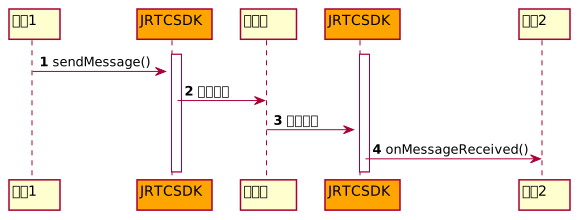
如果想在通话内给其他成员发送消息,可以调用 sendMessage (opens new window) 接口:
/**
* 发送消息,消息内容不能大于4K
*
* 指定成员会收到 {@link JRTCCallCallback#onMessageReceived onMessageReceived} 回调
* @param contentType 消息内容类型
* @param content 消息内容
* @param toUserId 指定成员的用户ID,传 undefined 给通话中全部成员发送消息
* @return 接口调用结果
* - true: 接口调用成功
* - false: 接口调用异常
*/
public abstract sendMessage(contentType: string, content: string, toUserId: string | undefined): boolean;
消息通过实现 JRTCCallCallback (opens new window) 的 onMessageReceived (opens new window) 接口上报。
/**
* 收到消息回调
*
* 通话中的成员可调用 {@link JRTCCall#sendMessage(string, string, string | undefined)}  sendMessage} 接口给通话中的指定成员或全体成员发送文本消息,接收消息的成员会收到此回调,由此获取消息具体信息。
* @param content 消息内容
* @param contentType 消息内容类型
* @param messageType 消息归属类型
* - {@link JRTCCallCenterMessageType#ONE_TO_ONE} : 一对一消息
* - {@link JRTCCallCenterMessageType#GROUP} : 群发消息(发送给通话中所有成员)
* @param fromUserId 发送方的用户ID
*/
onMessageReceived?: (content: string | undefined, contentType: string | undefined, messageType: JRTCCallCenterMessageType, fromUserId: string) => void;
示例代码:
//成员1发送消息给房间内所有成员
call.sendMessage(this.confMessageType, this.confMessageContent, "");
//成员1发送消息给成员2
call.sendMessage(this.confMessageType, this.confMessageContent, "成员2");

onMessageReceived: (content: string | undefined, contentType: string | undefined, messageType: JRTCMessageType, fromUserId: string) => {
  //成员2接收到来自成员1发送的消息
}
# 在线消息

只要登录到 Juphoon RTC 平台就可以通过 JRTCClient (opens new window) 的 sendOnlineMessage (opens new window) 实现在线消息的收发,消息内容不能大于4K。
/**
* 发送在线消息
*
* @param { string } message 消息内容
* @param { string } userId 对端的用户名
* @return { number } 接口调用结果
*  - 操作id: 接口调用成功,对应 {@link JRTCClientCallback.onOnlineMessageSendResult onOnlineMessageSendResult} 回调的 operatorId 参数
*  - -1: 接口调用异常,不会收到回调
* @note 消息大小不超过4k
*/
public abstract sendOnlineMessage(message: string, userId: string): number;
在线消息发送结果通过onOnlineMessageSendResult (opens new window) 回调通知。
/**
* 在线消息发送结果回调

*
* @param { boolean } result 发送结果是否成功
*                           - true:发送成功
*                           - false:发送失败
* @param { number } operatorId 操作id,对应 {@link JRTCClient.sendOnlineMessage sendOnlineMessage} 的返回值
*/
onOnlineMessageSendResult?: (result: boolean, operatorId: number) => void;
示例代码:
@State operatorId

// 给用户 7777 发送在线消息
this.operatorId = client.sendOnlineMessage("消息内容", "777");

// 给用户 7777 发送在线消息结果
onOnlineMessageSendResult:(result: boolean, operatorId: number) => {
    if (this.operatorId === operatorId) {
        if(result) {
            // 在线消息发送成功
        } else {
            // 在线消息发送失败
        }
    }
}

// 收到在线消息
onOnlineMessageReceived:(message: string, userId: string) => {
    // 收到来自 userId 的消息,消息内容为 message
}